Risk Analysis & Scoring
CodeXray analyzes your APIs using multiple security factors to generate a single, actionable risk score. This helps your team focus on the most critical issues first, rather than being overwhelmed by hundreds of findings.
How Risk Scoring Works
CodeXray evaluates six key factors to calculate an overall risk score from 0 to 100. Each factor is weighted based on its security impact.
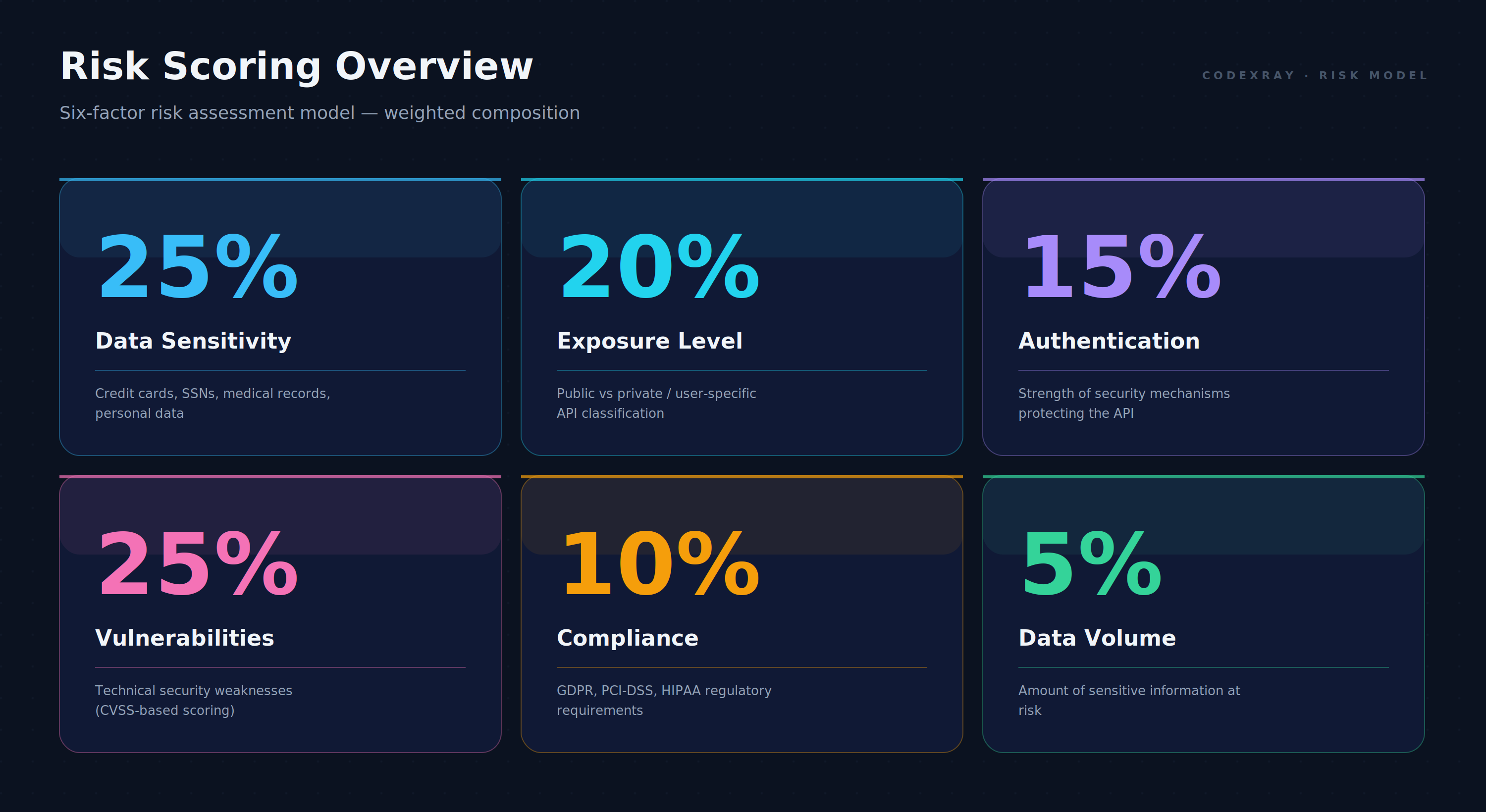
Six-factor risk scoring modelx
Scoring Factors
| Factor | Weight | What It Measures |
|---|---|---|
| Data Sensitivity | 25% | How critical is the data (credit cards, SSNs, emails) |
| Exposure Level | 20% | Is the API public or private/user-specific |
| Authentication | 15% | How strong is the API's authentication |
| Vulnerabilities | 25% | Technical security weaknesses found |
| Compliance | 10% | Regulatory requirements (GDPR, PCI-DSS, HIPAA) |
| Data Volume | 5% | Amount of sensitive data exposed |
Note: The most critical factors (Data Sensitivity and Vulnerabilities) receive the highest weight at 25% each.
Understanding Risk Levels
Your risk score determines the priority level for remediation.
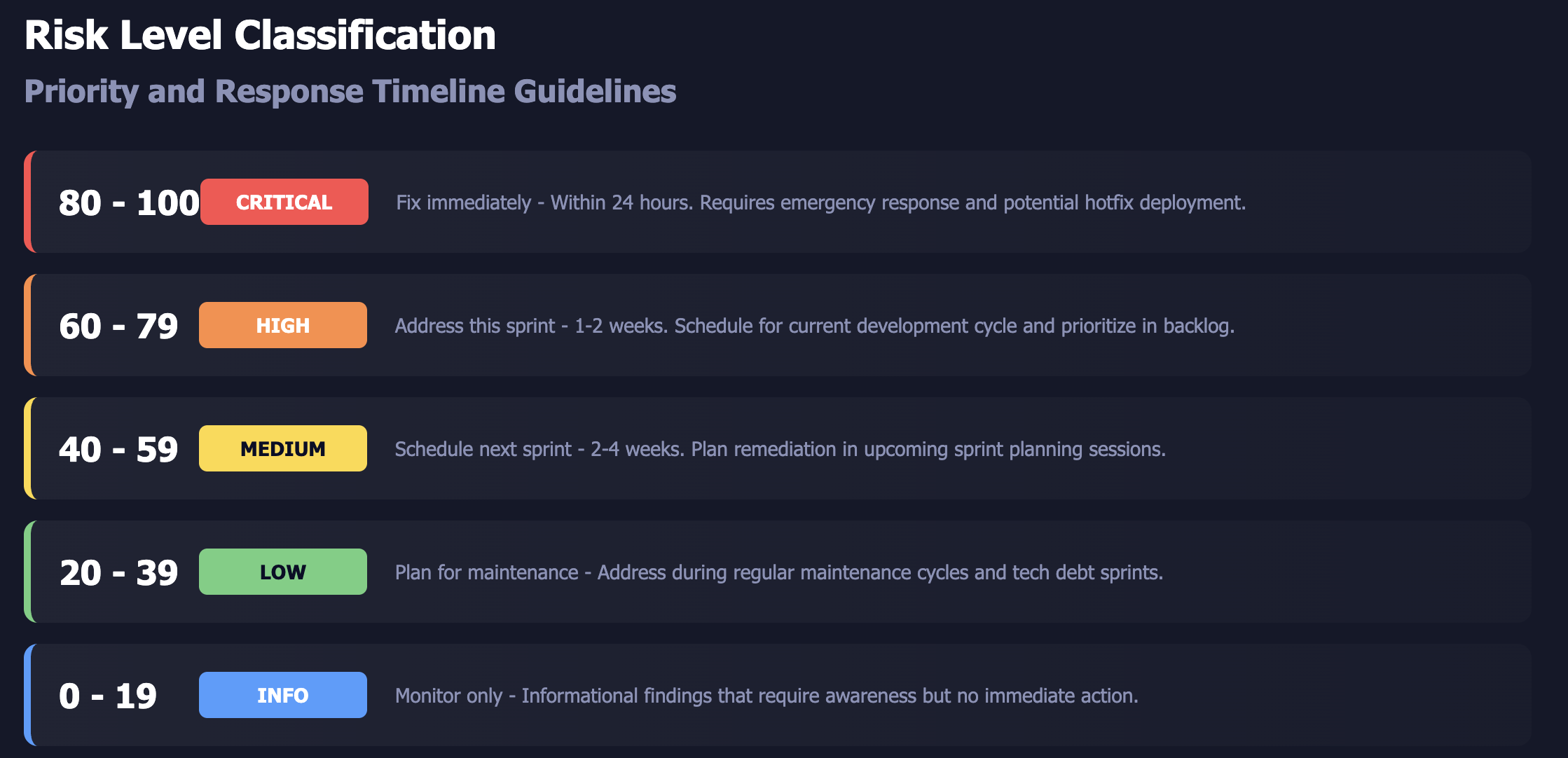
Risk level classification and recommended response times
| Score | Risk Level | Action Timeline |
|---|---|---|
| 80-100 | CRITICAL | Fix immediately (within 24 hours) |
| 60-79 | HIGH | Address this sprint (1-2 weeks) |
| 40-59 | MEDIUM | Schedule next sprint (2-4 weeks) |
| 20-39 | LOW | Plan for maintenance cycle |
| 0-19 | INFO | Monitor only |
Factor Details
Data Sensitivity
Measures the criticality of data handled by your API.
Scoring:
- Critical (100): Credit cards, SSNs, medical records, bank accounts
- High (75): Email, phone numbers, addresses, date of birth
- Medium (50): IP addresses, user IDs, session tokens
- Low (25): Usernames, public profile data
- None (0): No sensitive data
Example: An API that processes credit card payments will score 100 for data sensitivity, while a public catalog API scores 0.
Exposure Level
Distinguishes between public APIs and private user-specific APIs.
Scoring:
- Private/User-Specific (100): APIs like
/api/users/{id},/api/orders/{userId}that access specific user data - Public/Generic (30): APIs like
/api/login,/api/health,/api/public/catalog - Unknown (50): Cannot determine API type
Why This Matters: A private API without proper authentication is much riskier than a public API without authentication.
Authentication Strength
Evaluates how well your API is protected.
Scoring:
- No Authentication (100): No auth detected (risky for private APIs)
- Weak (80): Basic auth, known vulnerabilities, default credentials
- Standard (40): Bearer tokens, session cookies (properly implemented)
- Strong (20): OAuth2, multi-factor authentication
- Unknown (60): Auth method unclear
Vulnerabilities
Based on technical security issues found during scanning.
Scoring:
- Critical (100): CVSS score 9.0-10.0 (authentication bypass, remote code execution)
- High (75): CVSS score 7.0-8.9 (privilege escalation, injection flaws)
- Medium (50): CVSS score 4.0-6.9 (authorization issues, misconfigurations)
- Low (25): CVSS score 0.1-3.9 (minor information leakage)
- None (0): No vulnerabilities
CodeXray detects all OWASP API Security Top 10 vulnerabilities.
Compliance Risk
Identifies regulatory implications based on data types.
Regulatory Mapping:
- HIPAA (90): Medical records, health information
- PCI-DSS (80): Credit cards, payment data
- GDPR/CCPA (75-100): Personal identifiers, biometric data
- General (25-50): IP addresses, non-regulated data
Example: An API exposing credit card data triggers PCI-DSS compliance requirements.
Data Exposure Volume
Counts how much sensitive data is at risk.
Scoring:
- Very High (100): 10+ PII instances detected
- High (75): 5-9 PII instances
- Medium (50): 2-4 PII instances
- Low (25): 1 PII instance
- None (0): No PII detected
Example Calculations
Example 1: Payment Processing API - CRITICAL Risk
Endpoint: POST /api/payments/process
| Factor | Score | Reason |
|---|---|---|
| Data Sensitivity | 100 | Credit card detected |
| Exposure Level | 100 | Private user-specific API |
| Authentication | 40 | Standard bearer token |
| Vulnerabilities | 100 | CVSS 9.1 (authorization bypass) |
| Compliance | 80 | PCI-DSS applies |
| Data Volume | 100 | 12+ PII fields |
Calculation:
(100 × 0.25) + (100 × 0.20) + (40 × 0.20) + (100 × 0.25) + (80 × 0.10) + (100 × 0.10)
= 25 + 20 + 8 + 25 + 8 + 10 = 96
Result: CRITICAL (96) - Fix immediately
Example 2: Login API - HIGH Risk
Endpoint: POST /api/auth/login
| Factor | Score | Reason |
|---|---|---|
| Data Sensitivity | 75 | Email address detected |
| Exposure Level | 30 | Public generic endpoint |
| Authentication | 100 | No auth (expected for login) |
| Vulnerabilities | 50 | CVSS 4.2 (verbose errors) |
| Compliance | 75 | GDPR applies to email |
| Data Volume | 25 | 1 PII instance |
Calculation:
(75 × 0.25) + (30 × 0.20) + (100 × 0.20) + (50 × 0.25) + (75 × 0.10) + (25 × 0.10)
= 18.75 + 6 + 20 + 12.5 + 7.5 + 2.5 = 67.25
Result: HIGH (67) - Address within 1-2 weeks
Example 3: Health Check API - LOW Risk
Endpoint: GET /health
| Factor | Score | Reason |
|---|---|---|
| Data Sensitivity | 0 | No sensitive data |
| Exposure Level | 30 | Public generic endpoint |
| Authentication | 100 | No auth (expected) |
| Vulnerabilities | 25 | CVSS 2.1 (server version disclosure) |
| Compliance | 0 | No regulated data |
| Data Volume | 0 | No PII |
Calculation:
(0 × 0.25) + (30 × 0.20) + (100 × 0.20) + (25 × 0.25) + (0 × 0.10) + (0 × 0.10)
= 0 + 6 + 20 + 6.25 + 0 + 0 = 32.25
Result: LOW (32) - Monitor and plan for maintenance
Using Risk Scores Effectively
Prioritization Strategy
- Start with Critical - Focus on scores 80+ first
- Group Similar Issues - Fix related vulnerabilities together
- Consider Business Impact - Payment and user data APIs are priority
- Track Progress - Monitor score reductions over time
Customizing Weights
Organizations can adjust factor weights based on their priorities.
Default Weights (Balanced):
Data Sensitivity: 25%
Exposure Level: 20%
Authentication: 20%
Vulnerabilities: 25%
Compliance: 10%
Data Volume: 10%
Compliance-Focused:
Data Sensitivity: 30%
Vulnerabilities: 20%
Compliance: 15%
(Other factors adjusted accordingly)
Note: Contact your administrator to customize organizational risk scoring weights.
Frequently Asked Questions
Q: Why does my login API show high risk?
A: Login endpoints often score high due to lack of authentication (expected) and handling of email/passwords. The "public" classification (30 points) helps offset this. Review the vulnerability category to identify actual security issues.
Q: How often do risk scores update?
A: Risk scores recalculate automatically when new scans detect changes in vulnerabilities or PII exposure.
Q: Can I suppress false positives?
A: Yes, you can mark specific findings as false positives through the dashboard, which adjusts the risk score accordingly.
Q: What if no PII is detected but I know it's sensitive?
A: You can manually classify endpoints or contact support to add custom PII detection patterns for your organization.
Start using risk scores to prioritize your security efforts and reduce vulnerabilities faster.