Application Security Testing (AST)
CodeXray's Application Security Testing module provides automated, continuous security testing for your APIs. Built on industry-standard security frameworks, AST identifies vulnerabilities, misconfigurations, and security weaknesses before they reach production.
Overview
AST performs comprehensive security analysis by executing test suites against your API endpoints. Each test run evaluates APIs against hundreds of security rules spanning authentication flaws, authorization bypasses, injection vulnerabilities, and configuration weaknesses.
Key Capabilities:
Automated Test Execution
- Schedule tests to run automatically on code commits, deployments, or time-based intervals
- Execute on-demand tests through dashboard or API
- Parallel test execution for faster results
Comprehensive Coverage
- OWASP API Security Top 10 detection
- Authentication and authorization testing
- Input validation and injection vulnerabilities
- Security misconfiguration identification
- Business logic flaw detection
Actionable Intelligence
- Severity-based prioritization (Critical, High, Medium, Low)
- Detailed vulnerability descriptions with exploit scenarios
- Step-by-step remediation guidance
- Code-level fix recommendations
How AST Works
AST operates through a multi-stage testing pipeline that evaluates API security from multiple perspectives.
Test Execution Flow
Stage 1: Test Initialization
When you trigger an AST scan, CodeXray prepares the test environment by:
- Loading API definitions from your inventory
- Selecting applicable test rules based on endpoint characteristics
- Configuring authentication and authorization contexts
- Preparing test payloads and attack vectors
Stage 2: Active Security Testing
AST actively probes your APIs with carefully crafted requests designed to uncover vulnerabilities:
- Authentication bypass attempts
- Authorization boundary testing
- Input validation testing with malicious payloads
- Rate limiting and resource consumption tests
- Security header analysis
Stage 3: Passive Analysis
Alongside active testing, AST performs passive analysis of API responses:
- Information disclosure detection
- Error message analysis
- Security header evaluation
- Cookie security assessment
- TLS/SSL configuration review
Stage 4: Vulnerability Classification
Discovered issues are classified and scored:
- Mapping to OWASP API Security Top 10 categories
- Severity assignment based on exploitability and impact
- Risk scoring considering business context
- Deduplication of similar findings
Stage 5: Results Presentation
Test results are compiled into actionable reports:
- Executive summary with key metrics
- Detailed vulnerability listings with reproduction steps
- Remediation guidance with code examples
- Trend analysis comparing current and previous runs
AST Dashboard
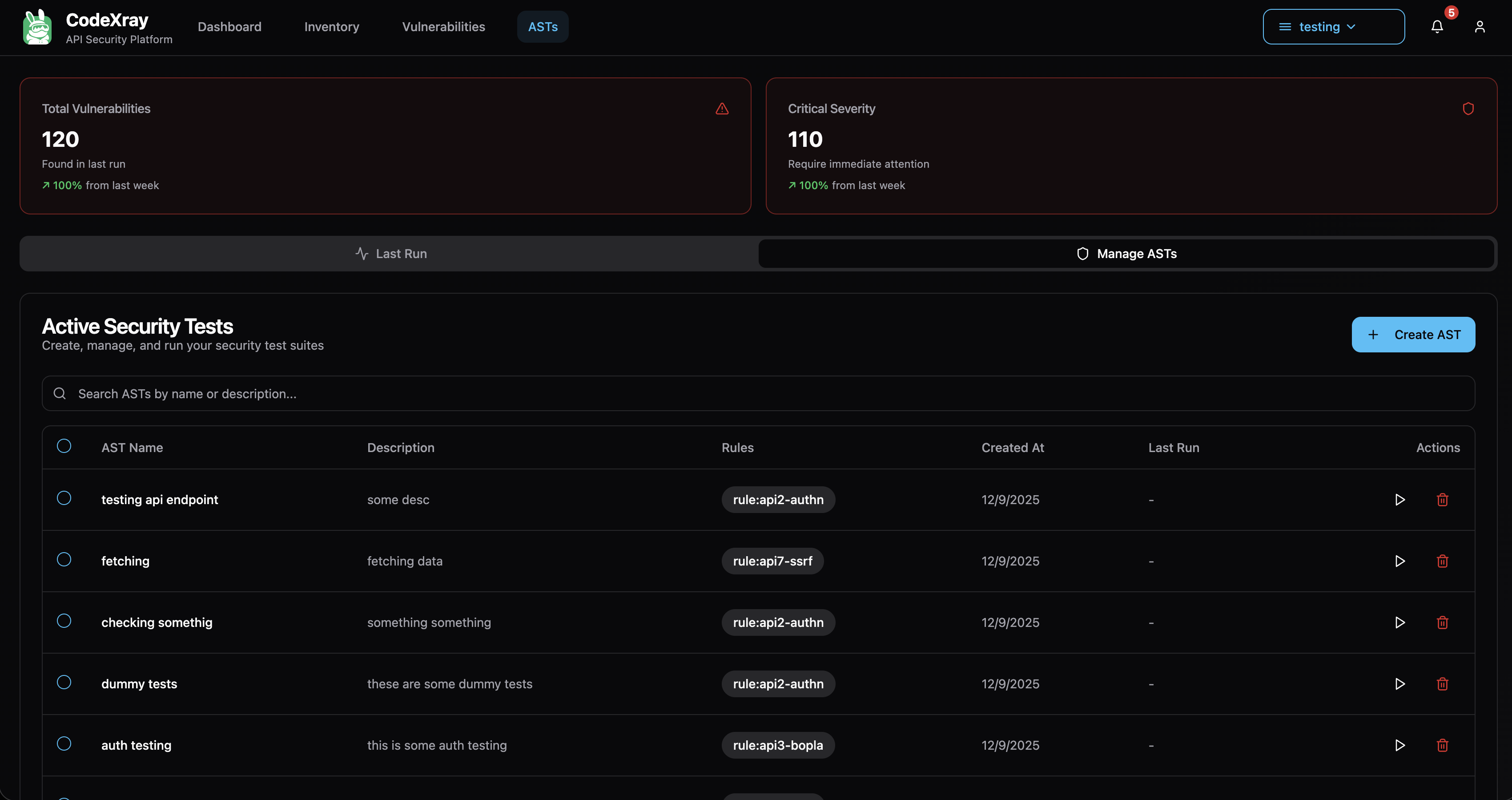
AST Dashboard showing test run summary and vulnerability metrics
The AST dashboard provides immediate visibility into your API security posture following each test execution.
Summary Metrics
Total Vulnerabilities
- Aggregate count of all security issues discovered
- Week-over-week trend indicators
- Comparison with previous test runs
Critical Severity Count
- Number of vulnerabilities requiring immediate attention
- High-risk issues that could lead to data breaches or system compromise
- Trend analysis showing progress in addressing critical issues
Test Run Information
- Timestamp of most recent test execution
- Duration of test run
- Number of APIs tested
- Total rules evaluated
Test Run Results
Detailed test run results showing per-API vulnerability breakdown
Each test run generates comprehensive results organized by API endpoint, showing exactly which vulnerabilities were detected and where.
Results Structure
Test Run Header
- Test name or identifier
- Number of APIs tested
- Execution timestamp and duration
- Total violation count
Per-API Results
- Endpoint path and HTTP method
- Response time metrics
- Number of rules violated
- List of detected vulnerabilities
Vulnerability Details Each detected vulnerability includes:
- Vulnerability category and OWASP mapping
- Severity level (Critical, High, Medium, Low)
- Detailed description of the security issue
- Reproduction steps
- Remediation guidance
Common Vulnerability Categories
AST detects a wide range of security vulnerabilities across multiple categories:
Broken Object Level Authorization (BOLA)
Description: APIs fail to properly validate that the authenticated user has permission to access the requested object.
Example Vulnerabilities:
- ID Enumeration: Attackers can iterate through object IDs to access unauthorized data
- Missing Authorization Checks: Endpoints accept object identifiers without verifying ownership
Impact: Unauthorized access to sensitive data belonging to other users or organizations.
Remediation:
- Implement proper authorization checks on all object access
- Use random, non-guessable object identifiers
- Validate user permissions before returning requested objects
Broken Function Level Authorization
Description: APIs expose administrative or privileged functions to regular users due to improper role-based access controls.
Example Vulnerabilities:
- HTTP Method Tampering: Changing GET to PUT/DELETE bypasses authorization
- Method Override Bypass: Using X-HTTP-Method-Override headers to access restricted operations
Impact: Privilege escalation allowing regular users to perform administrative actions.
Remediation:
- Enforce role-based access control at the function level
- Validate user permissions for all HTTP methods
- Disable method override headers if not required
Unrestricted Resource Consumption
Description: APIs lack proper rate limiting or resource consumption controls, enabling denial of service attacks.
Example Vulnerabilities:
- Missing Rate Limiting: No restrictions on request frequency
- Excessive Resource Allocation: APIs allocate unbounded resources per request
Impact: Service degradation, increased infrastructure costs, denial of service.
Remediation:
- Implement rate limiting per user/IP address
- Set reasonable timeouts for long-running operations
- Limit response sizes and pagination
Security Misconfiguration
Description: APIs are deployed with insecure default configurations, missing security headers, or overly permissive settings.
Example Vulnerabilities:
- Missing Security Headers: Absence of HSTS, CSP, X-Frame-Options
- Verbose Error Messages: Stack traces and internal paths exposed in errors
- Unnecessary HTTP Methods: OPTIONS, TRACE methods enabled
Impact: Information disclosure, increased attack surface, easier exploitation of other vulnerabilities.
Remediation:
- Enable security headers (HSTS, CSP, X-Content-Type-Options)
- Disable unnecessary HTTP methods
- Implement generic error messages for production
- Remove debug endpoints before deployment
Test Configuration
Creating a Test Suite
AST allows you to configure test suites tailored to your specific security requirements.
Basic Configuration:
- Navigate to ASTs → Manage ASTs
- Click "Create New Test Suite"
- Configure test parameters:
- Test Name: Descriptive identifier for the test
- Target APIs: Select specific endpoints or entire domains
- Test Rules: Choose which security rules to apply
- Scheduling: Configure automated execution frequency
Advanced Configuration:
Authentication Context
- Configure authentication credentials for testing protected endpoints
- Support for Bearer tokens, API keys, OAuth2 flows
- Session management for multi-step authentication
Test Scope
- Include/exclude specific API paths
- Filter by HTTP methods
- Target specific API versions
Performance Settings
- Concurrent request limits
- Request timeout values
- Rate limiting for test execution
Interpreting Results
Severity Levels
AST assigns severity levels based on exploitability and potential impact:
Critical
- Immediate exploitation possible with severe consequences
- Examples: Authentication bypass, SQL injection, remote code execution
- Action Required: Fix immediately, consider temporary mitigation
High
- Significant security impact, relatively easy to exploit
- Examples: Authorization bypass, sensitive data exposure
- Action Required: Address within current sprint
Medium
- Moderate security impact or requires specific conditions to exploit
- Examples: Missing security headers, information disclosure
- Action Required: Schedule for upcoming sprint
Low
- Limited security impact or difficult to exploit
- Examples: Minor configuration issues, informational findings
- Action Required: Address during regular maintenance
Test Execution Best Practices
Development Environment Testing
Run AST early and frequently in development:
- Execute tests on feature branches before merging
- Integrate with CI/CD pipelines for automated testing
- Test against local or staging environments first
Staging Environment Validation
Validate security before production deployment:
- Run comprehensive test suites before release
- Verify fixes for previously identified vulnerabilities
- Test with production-like data and configurations
Production Monitoring
Maintain security posture in production:
- Schedule regular security scans (weekly or monthly)
- Focus on non-intrusive passive analysis
- Monitor for new vulnerabilities in unchanged code
- Track remediation progress over time
Test Scope Management
Optimize test execution for efficiency:
- Start with critical APIs and expand gradually
- Use filters to focus on high-risk endpoints
- Exclude third-party APIs you don't control
- Balance comprehensive coverage with execution time
Remediation Workflow
Vulnerability Triage Process
Step 1: Review and Validate
- Review detected vulnerabilities for false positives
- Validate exploitability in your specific context
- Assess actual business impact
Step 2: Prioritize
- Address critical and high severity issues first
- Consider exploit likelihood and data sensitivity
- Balance security fixes with feature development
Step 3: Implement Fixes
- Follow provided remediation guidance
- Test fixes in development environment
- Verify fix effectiveness with re-scan
Step 4: Document and Track
- Document remediation decisions
- Track accepted risks with justification
- Update security documentation
Step 5: Verify Resolution
- Re-run AST to confirm vulnerability is resolved
- Check for regression in future scans
- Update security baselines
Compliance and Reporting
Compliance Mapping
AST findings map to major compliance frameworks:
OWASP API Security Top 10
- Direct mapping to all OWASP categories
- Coverage reports showing protection status
- Trend analysis of OWASP category distribution
PCI DSS Requirements
- Requirement 6.5: Secure coding practices
- Requirement 11.3: Penetration testing
- Automated evidence collection for audits
SOC 2 Controls
- CC6.1: Logical and physical access controls
- CC7.1: Security vulnerabilities detection
- Regular security testing documentation
Executive Reporting
Generate reports for different stakeholders:
Security Team Reports
- Detailed vulnerability listings with technical details
- Remediation progress tracking
- Trend analysis over time
Development Team Reports
- Per-API vulnerability breakdown
- Code-level remediation guidance
- Integration with issue tracking systems
Executive Dashboards
- High-level security posture metrics
- Risk trends and improvement indicators
- Compliance status overview
Advanced Features
Custom Security Rules
Extend AST with organization-specific security requirements:
Rule Definition
- Define custom test logic for proprietary security policies
- Specify detection patterns and validation criteria
- Set severity levels and remediation guidance
Rule Management
- Enable/disable rules per test suite
- Version control for rule definitions
- Share rules across teams and projects
Vulnerability Suppression
Manage false positives and accepted risks:
Suppression Criteria
- Suppress specific vulnerabilities with justification
- Time-bound suppressions for temporary acceptance
- Require approval workflow for suppressions
Audit Trail
- Track all suppression decisions
- Maintain justification documentation
- Periodic review of suppressed findings
Troubleshooting
Test Execution Issues
Tests Timing Out
Tests may timeout due to slow API responses or network issues.
Resolution:
- Increase timeout values in test configuration
- Reduce number of concurrent requests
- Check API performance and optimize slow endpoints
Authentication Failures
Tests fail to authenticate with target APIs.
Resolution:
- Verify authentication credentials are current
- Check token expiration and refresh logic
- Ensure test user has appropriate permissions
- Review authentication method configuration
Incomplete Results
Not all APIs are tested in execution.
Resolution:
- Check API filters and scope configuration
- Verify APIs are accessible from test environment
- Review execution logs for errors
- Ensure sufficient test execution timeout
Result Interpretation Issues
High False Positive Rate
Many reported vulnerabilities don't apply to your context.
Resolution:
- Customize test rules for your environment
- Use suppression with documentation
- Adjust severity thresholds
- Provide feedback to improve detection accuracy
Missing Expected Vulnerabilities
Known vulnerabilities not detected by AST.
Resolution:
- Verify test scope includes affected APIs
- Check if appropriate test rules are enabled
- Consider manual security review
- Submit detection improvement requests
Next Steps
Expand your security testing capabilities:
- Risk Analysis & Insights – Understand overall API security posture
- Alerts & Policies – Configure automated security alerts
Getting Started with AST
Quick Start Checklist:
-
Configure Test Suite
- Navigate to ASTs → Manage ASTs
- Create your first test suite
- Select target APIs
-
Execute First Test
- Click "Run Test" from dashboard
- Monitor execution progress
- Review results when complete
-
Triage Findings
- Review detected vulnerabilities
- Prioritize based on severity
- Create remediation tasks
-
Implement Fixes
- Follow remediation guidance
- Deploy fixes to staging
- Re-run tests to verify
Begin securing your APIs with comprehensive automated testing today.