Data Collection & Ingestion
CodeXray establishes comprehensive API visibility by combining automated runtime monitoring with flexible manual upload capabilities. This dual-approach ensures complete coverage of your API landscape, from documented endpoints to undiscovered shadow APIs.
Collection Methods Overview
CodeXray supports multiple collection methods to accommodate different use cases and deployment scenarios. Each method feeds into a unified ingestion pipeline that normalizes, enriches, and analyzes API data in real-time.
Automated Runtime Collection
SDK Instrumentation
Deploy CodeXray's lightweight SDK within your applications to enable continuous API monitoring. The SDK automatically captures request and response telemetry, transmitting it to the CodeXray platform for analysis without manual intervention.
Key Capabilities:
- Zero-configuration automatic discovery
- Real-time traffic capture and transmission
- Minimal performance overhead
- Continuous security monitoring
Ideal For: Production environments requiring ongoing visibility, DevOps teams seeking automated security workflows, and organizations with dynamic API landscapes.
Manual Upload Methods
Postman Collection Import
Upload Postman collections directly through the CodeXray dashboard to analyze API specifications, test scenarios, and documented endpoints.
Use Cases:
- Pre-deployment security assessment
- API design review and validation
- Testing environment analysis
- Documentation-driven security audits
HAR File Analysis
Import HAR (HTTP Archive) files captured from browser developer tools or proxy applications to analyze client-side API interactions and web application traffic patterns.
Use Cases:
- Browser-based application security testing
- Client-side API discovery
- Front-end security assessment
- Ad-hoc traffic analysis
Best Practice: Combine SDK instrumentation for continuous monitoring with periodic HAR/Postman uploads to validate security posture across development, testing, and production environments.
Ingestion Pipeline Architecture
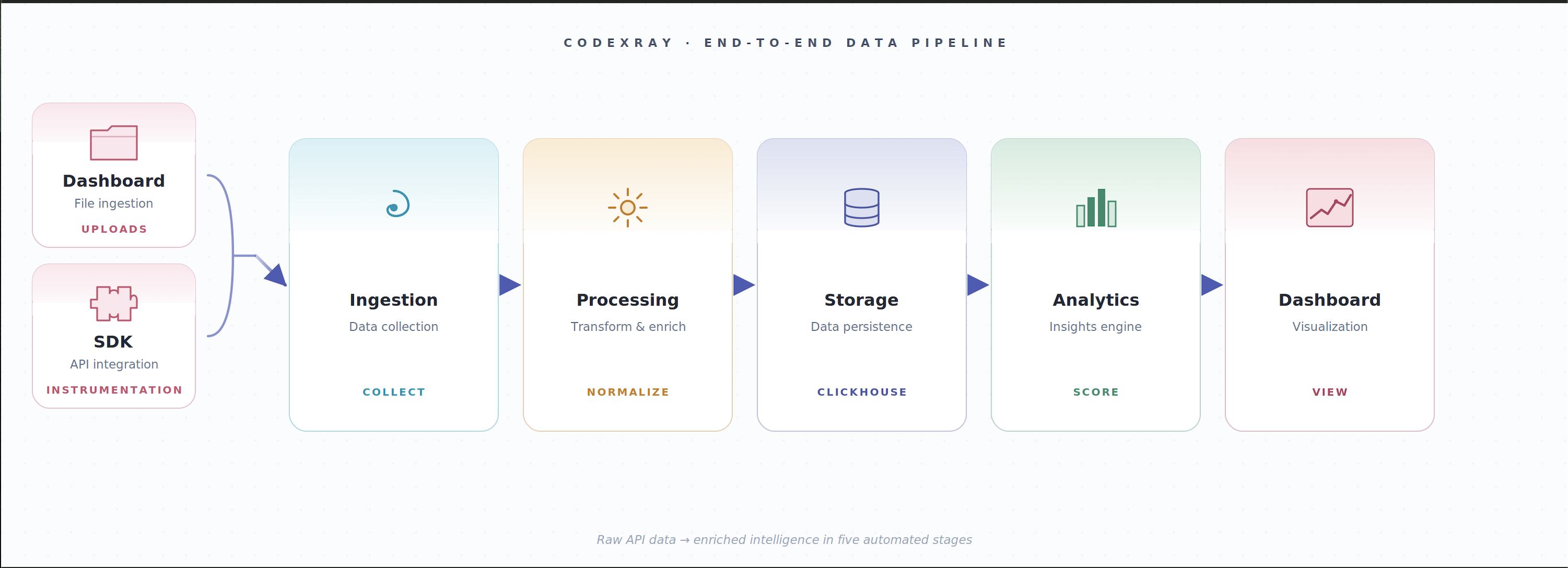
CodeXray's ingestion pipeline transforms raw API data into actionable security intelligence through a series of automated processing stages. Each stage adds value by enriching, classifying, and analyzing the collected data.
Stage 1: Data Capture
Dashboard Upload Interface
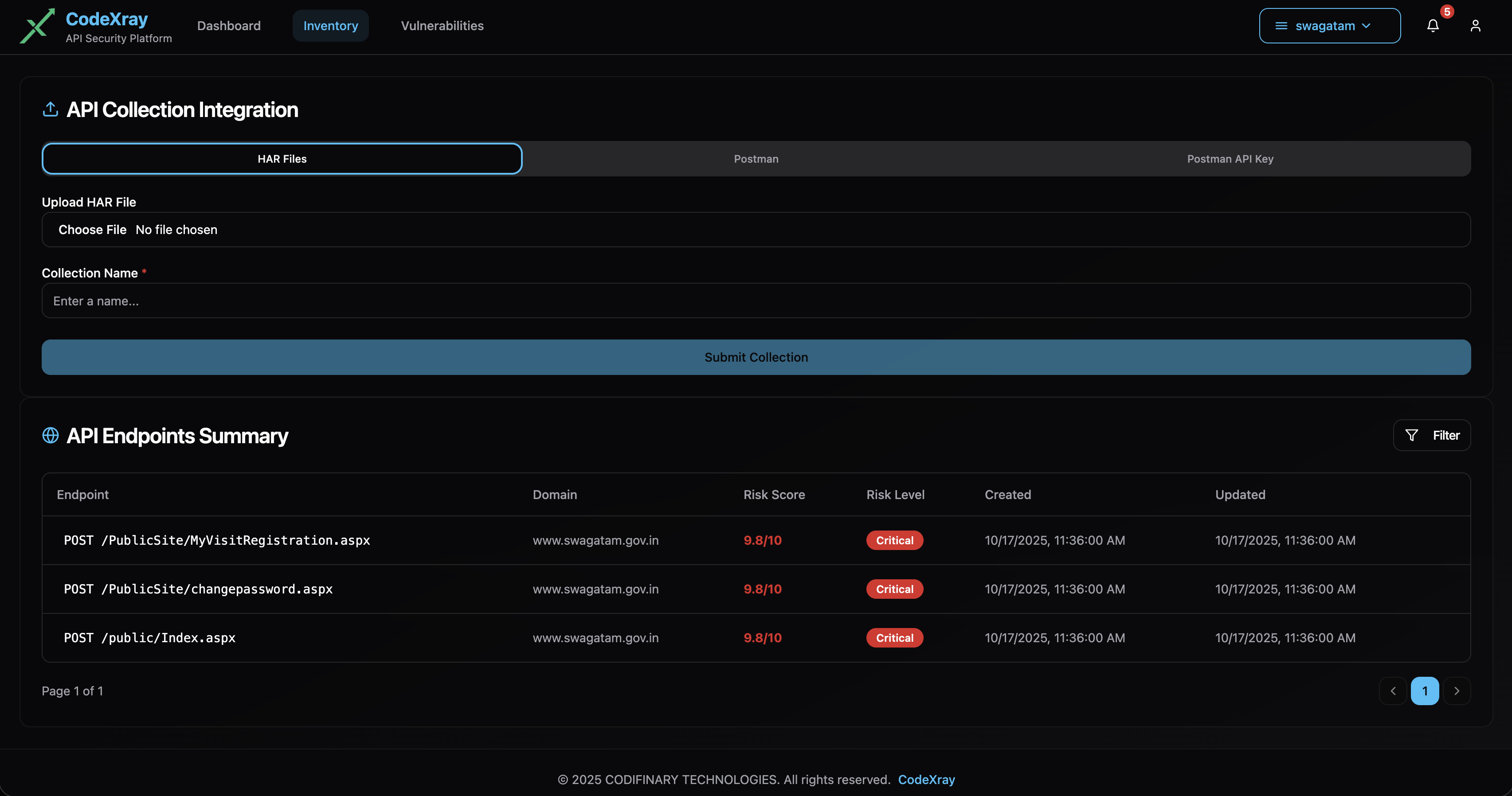
The CodeXray web interface provides intuitive upload capabilities for manual data collection methods. Users can drag and drop files or select them through standard file browsers.
Supported Formats:
- Postman Collection (JSON format)
- HAR files (HTTP Archive format)
Metadata Extraction:
- HTTP methods and endpoints
- Request and response headers
- Query parameters and path variables
- Request and response body schemas
- Authentication mechanisms
- Response status codes
SDK Telemetry Stream
For SDK-instrumented applications, telemetry flows automatically to the CodeXray platform. The SDK captures identical metadata to manual uploads, ensuring consistency across collection methods.
Stage 2: Ingestion & Normalization
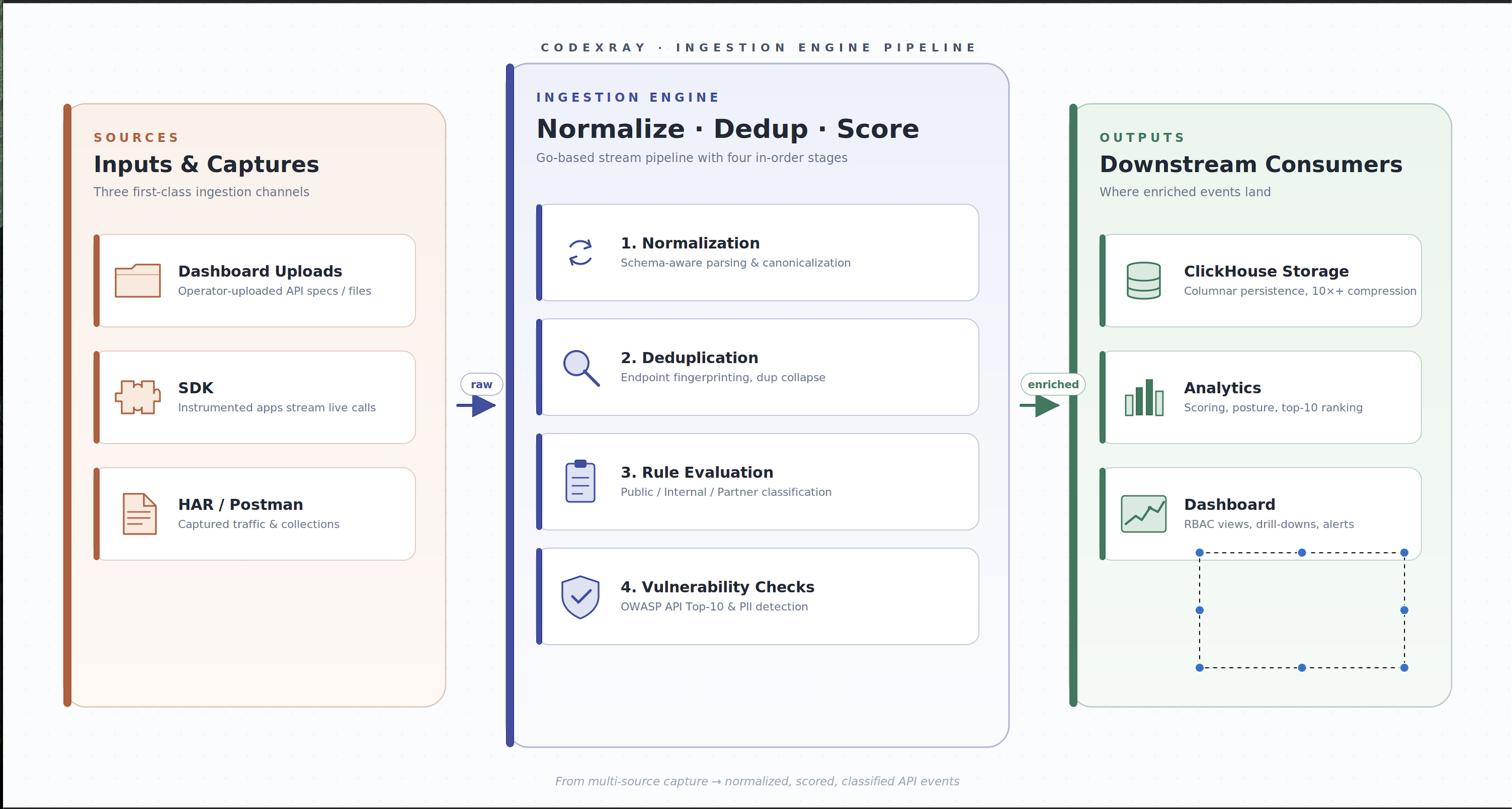
Processing Components:
Validation Engine
- Format verification and schema validation
- Data integrity checks
- Duplicate detection and deduplication
- Corruption and incomplete data handling
Normalization Service
- Unified data model transformation
- Cross-source schema reconciliation
- Standardized field mapping
- Consistent timestamp formatting
Enrichment Layer
- Domain and subdomain identification
- API versioning detection
- Authentication method classification
- Content-type analysis
Technical Foundation: Built on high-performance Golang services, the ingestion layer processes thousands of API calls per second with minimal latency. The stateless architecture enables horizontal scaling to handle enterprise-scale telemetry volumes.
Stage 3: Rule Evaluation & Risk Analysis
Once normalized, API data flows through CodeXray's security analysis engine. This stage applies comprehensive security rules to identify vulnerabilities, assess risk, and classify APIs according to exposure level.
Security Analysis Components:
Vulnerability Detection
- OWASP API Security Top 10 pattern matching
- Personally Identifiable Information (PII) detection
- Sensitive data exposure analysis
- Authentication and authorization weakness identification
- Injection vulnerability assessment
Risk Scoring
- Multi-factor risk calculation
- Severity assignment (Critical, High, Medium, Low)
- Business impact assessment
- Exploitability analysis
API Classification
- Public: Internet-facing APIs accessible to external consumers
- Internal: APIs restricted to internal systems and services
- Partner: APIs shared with trusted third-party integrations
Real-Time Processing: Risk evaluation occurs in-stream as APIs are ingested, enabling immediate visibility into newly discovered vulnerabilities without batch processing delays.
Technical Note: The rule evaluation engine is extensible, allowing custom security policies to be defined and applied alongside built-in detections.
Stage 4: Persistent Storage
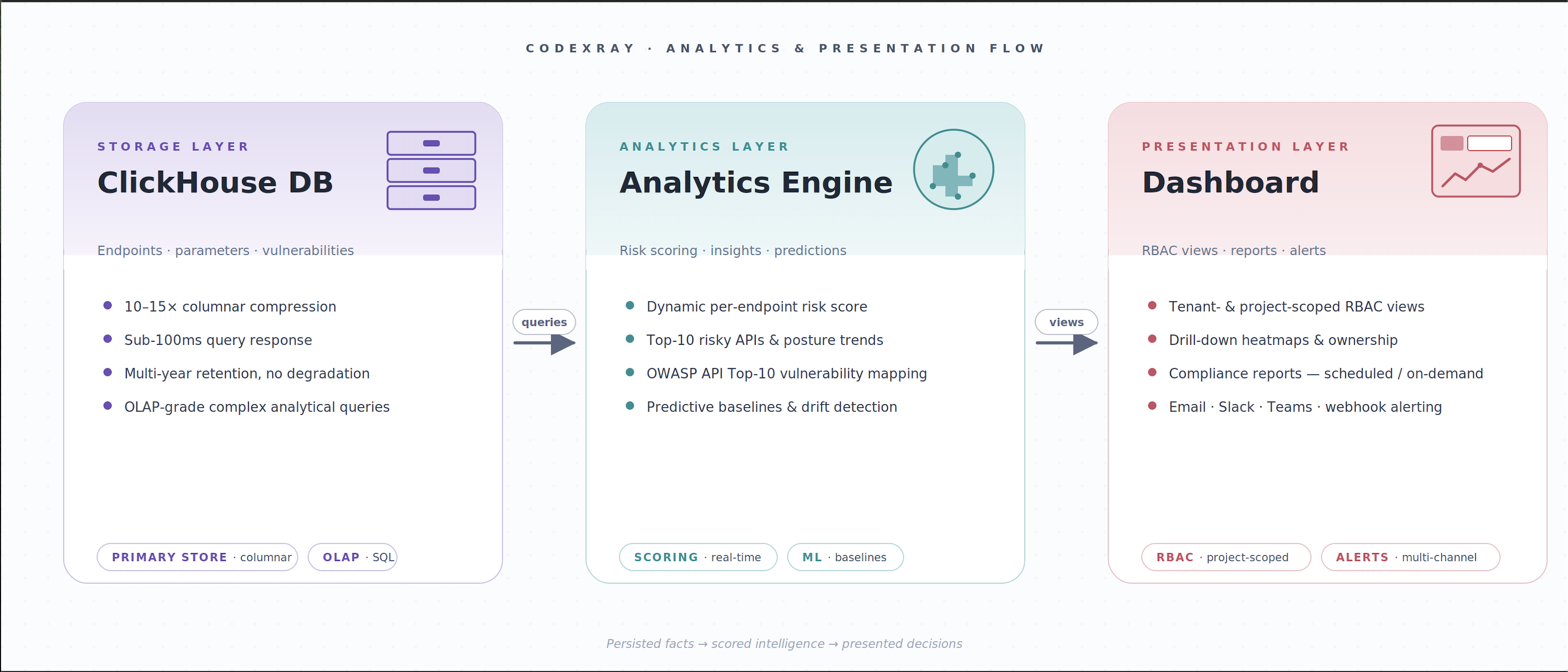
Database Architecture:
CodeXray leverages ClickHouse, a columnar analytical database optimized for high-cardinality time-series data. This foundation enables both real-time dashboards and long-term trend analysis.
Stored Entities:
- API endpoint metadata and schemas
- Request and response patterns
- Vulnerability findings and risk scores
- Historical trend data
- Authentication and authorization metadata
Performance Characteristics:
- Sub-100ms query response times for dashboard visualizations
- 10-15x data compression ratios
- Multi-year data retention without performance degradation
- Support for complex analytical queries
Data Retention: Configurable retention policies balance storage costs with compliance and historical analysis requirements. Typical deployments retain 12-24 months of detailed telemetry.
Stage 5: Visualization & Analytics
The final stage presents processed API data through CodeXray's security dashboard, providing role-specific views tailored to different stakeholders.
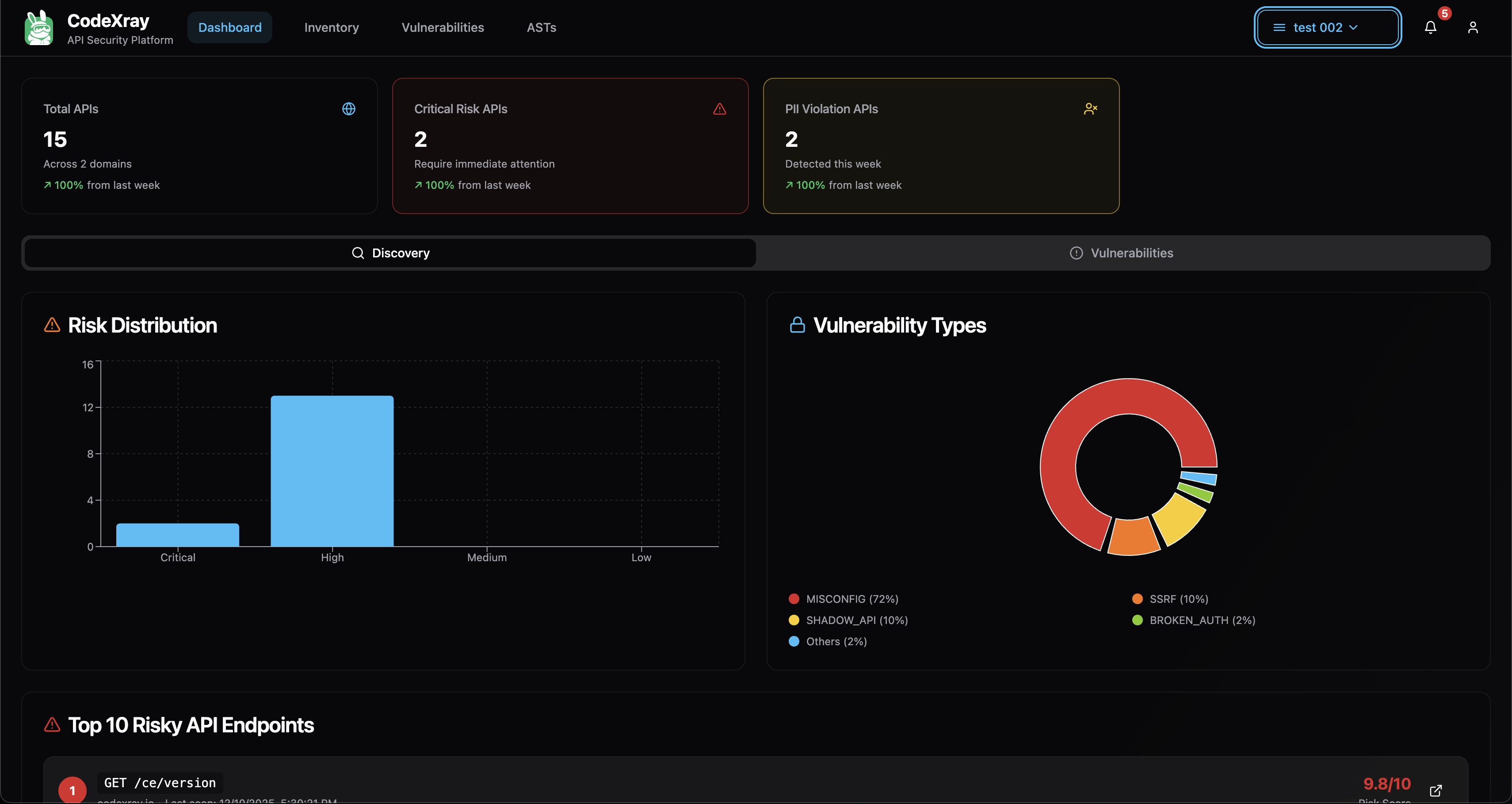
Dashboard Capabilities:
Inventory Management
- Complete API catalog with search and filtering
- Endpoint discovery timeline
- Shadow API identification
- Versioning and deprecation tracking
Security Posture
- Organization-wide risk score
- Top 10 highest-risk APIs
- Vulnerability distribution by severity
- Trend analysis and historical comparison
Detailed Analysis
- Per-endpoint vulnerability details
- OWASP category mapping
- Remediation guidance and code examples
- Affected parameter identification
- Historical change tracking
Data Collection Best Practices
Start with Manual Uploads
Begin your CodeXray implementation with Postman collections or HAR files to establish baseline visibility. This approach provides immediate value and helps teams become familiar with the platform before deploying SDK instrumentation.
Progressive SDK Rollout
Deploy SDK instrumentation incrementally, starting with non-critical applications or development environments. Validate telemetry accuracy and performance impact before expanding to production systems.
Maintain Multiple Collection Sources
Use SDK instrumentation for continuous production monitoring while maintaining periodic manual uploads from testing and staging environments. This multi-source approach ensures comprehensive coverage across the application lifecycle.
Regular Collection Cadence
For manual upload workflows, establish regular intervals for collection (daily, weekly, or per sprint). Consistent collection enables trend analysis and ensures newly developed APIs are promptly discovered.
Validate Data Completeness
Review ingestion logs and dashboard inventory to confirm all expected APIs are being captured. Pay particular attention to APIs behind authentication or those accessed through non-standard methods.
Collection Method Comparison
| Aspect | SDK Instrumentation | Postman Upload | HAR Upload |
|---|---|---|---|
| Setup Effort | Moderate (one-time integration) | Minimal (export and upload) | Minimal (browser capture) |
| Coverage | Continuous, comprehensive | Specification-based | Session-based |
| Update Frequency | Real-time | Manual refresh | Manual refresh |
| Environment | Runtime (prod/staging) | Any | Browser/client-side |
| Shadow API Discovery | Yes | No (documented only) | Yes (captured traffic) |
| Best Use Case | Production monitoring | API design validation | Browser app testing |
Security & Privacy Considerations
Data Transmission Security
All telemetry transmitted to CodeXray is encrypted in transit using TLS 1.2 or higher. SDK communication uses certificate-pinned connections to prevent man-in-the-middle attacks.
Sensitive Data Handling
CodeXray automatically redacts common sensitive data patterns (credit cards, social security numbers, authentication tokens) before storage. Additional redaction rules can be configured for organization-specific sensitive data.
Compliance Alignment
The ingestion pipeline supports compliance requirements including GDPR, HIPAA, and PCI DSS through configurable data retention policies and automated PII detection.
Access Controls
Ingested data is subject to role-based access controls defined at the organization and team level. Users can only view API data for resources they are authorized to access.
Troubleshooting Common Collection Issues
SDK Not Transmitting Data
Verify network connectivity to CodeXray endpoints, confirm API key configuration, and check application logs for SDK error messages. Ensure firewall rules permit outbound HTTPS traffic to CodeXray infrastructure.
Postman Collection Upload Failures
Validate that the collection file is in valid JSON format and uses Postman Collection v2.1 schema. Collections exported from older Postman versions may require updating before import.
Incomplete HAR Data
Ensure HAR files are captured with full request/response body recording enabled in browser developer tools. Some browsers limit HAR file size; for large sessions, consider capturing multiple smaller HAR files.
Duplicate API Detection
CodeXray deduplicates APIs based on endpoint path, HTTP method, and domain. If duplicates appear, verify that API versioning is consistently represented across collection sources.
Next Steps
Now that you understand CodeXray's data collection capabilities, explore related documentation:
- Architecture Overview – Understand the complete system architecture
- Risk Analysis & Insights – Learn how collected data is analyzed for security insights
Getting Started with Collection
Quick Start: Manual Upload
- Export a Postman collection from your workspace
- Navigate to the CodeXray dashboard upload section
- Drag and drop the collection file
- Review discovered APIs in the inventory view
Production Deployment: SDK Integration
- Review SDK integration documentation for your application framework
- Add CodeXray SDK dependency to your project
- Configure SDK with your organization's API key
- Deploy instrumented application to staging environment
- Validate telemetry in CodeXray dashboard
- Promote to production after validation
Contact your CodeXray solutions team for assistance with collection method selection and deployment planning.